Chrome Web Store reviewer guide
Video2Source
Save visible YouTube transcript text, timestamps, and notes as local source pack files.
Reproducible Test Steps
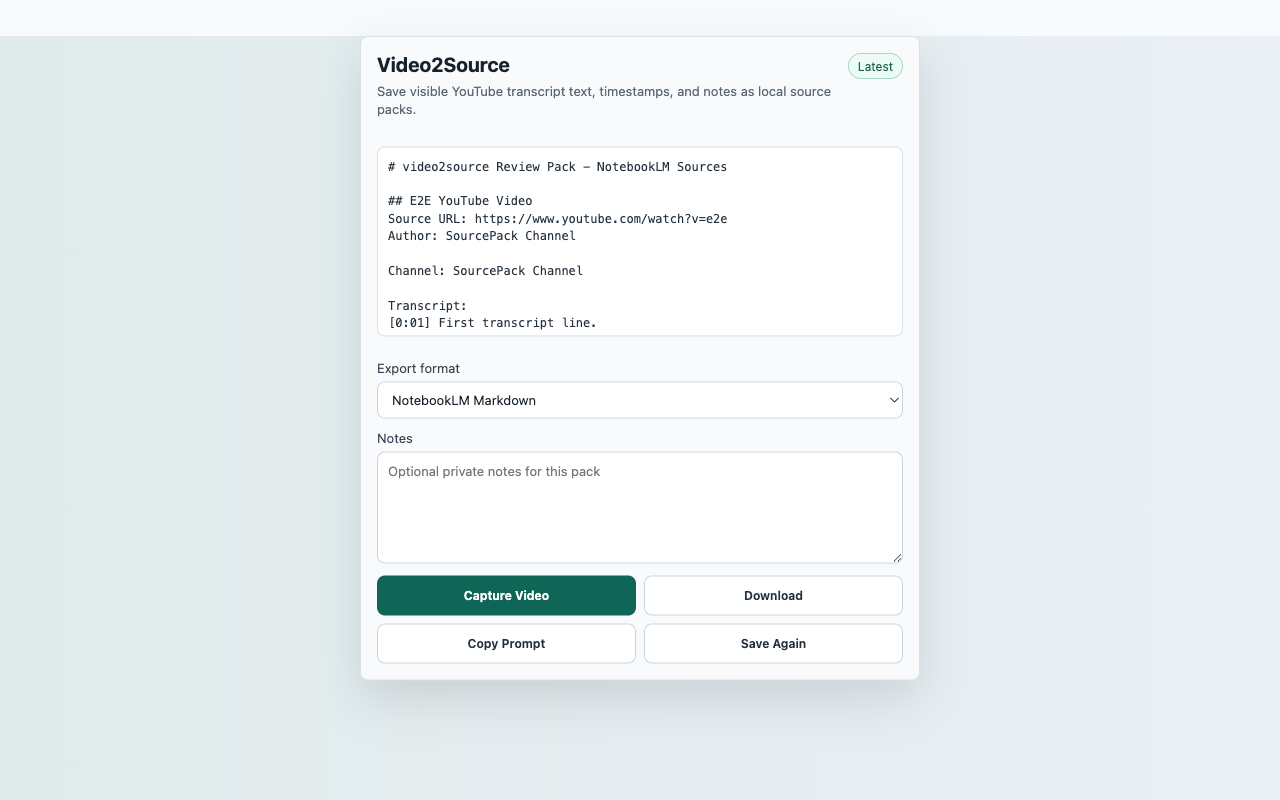
- Open a public YouTube video page.
- Open the transcript panel if the page has not rendered transcript segments.
- Click the Video2Source toolbar action and choose Capture Video.
- Verify the preview includes the video title, URL, and transcript status.
- Download Markdown or SourcePack JSON and confirm the file is created by the user action.
Expected Result
- The popup shows a saved status after capture.
- The preview contains transcript text or an explicit transcript-unavailable line.
- No server login, API key, or redirect is required.
CredentialsNo SourcePack account, API key, backend, or paid service is required. YouTube availability and transcript rendering are controlled by YouTube.
User actionCapture starts only after the reviewer clicks Capture Video.
Data locationRecent captures in chrome.storage.local
Network postureNo captured page, chat, repo, transcript, table, or competitor content is uploaded to a SourcePack server.